
What these templates do
Shipments that have clearly arrived still sit open on the platform until someone closes them out by hand. That manual step is easy to forget, and forgotten shipments distort your analytics and leave "zombie" shipments lingering in your active list.
These templates remove the step. You pick the arrival signal that matches how your shipments actually behave, turn the template on once, and Workflow Automations marks shipments complete on its own.
|
If you want to close a shipment when… |
Use |
|---|---|
|
The tracker detects light at the destination (e.g. doors opening for unloading) |
Complete Shipment on Unloading |
|
The tracker has gone idle |
Intelligent Shipment Completion |
Complete Shipment on Unloading
When the tracker detects light inside the destination, typically doors opening for unloading, it takes that as the ground-truth signal that the goods have arrived and marks the shipment complete on its own.
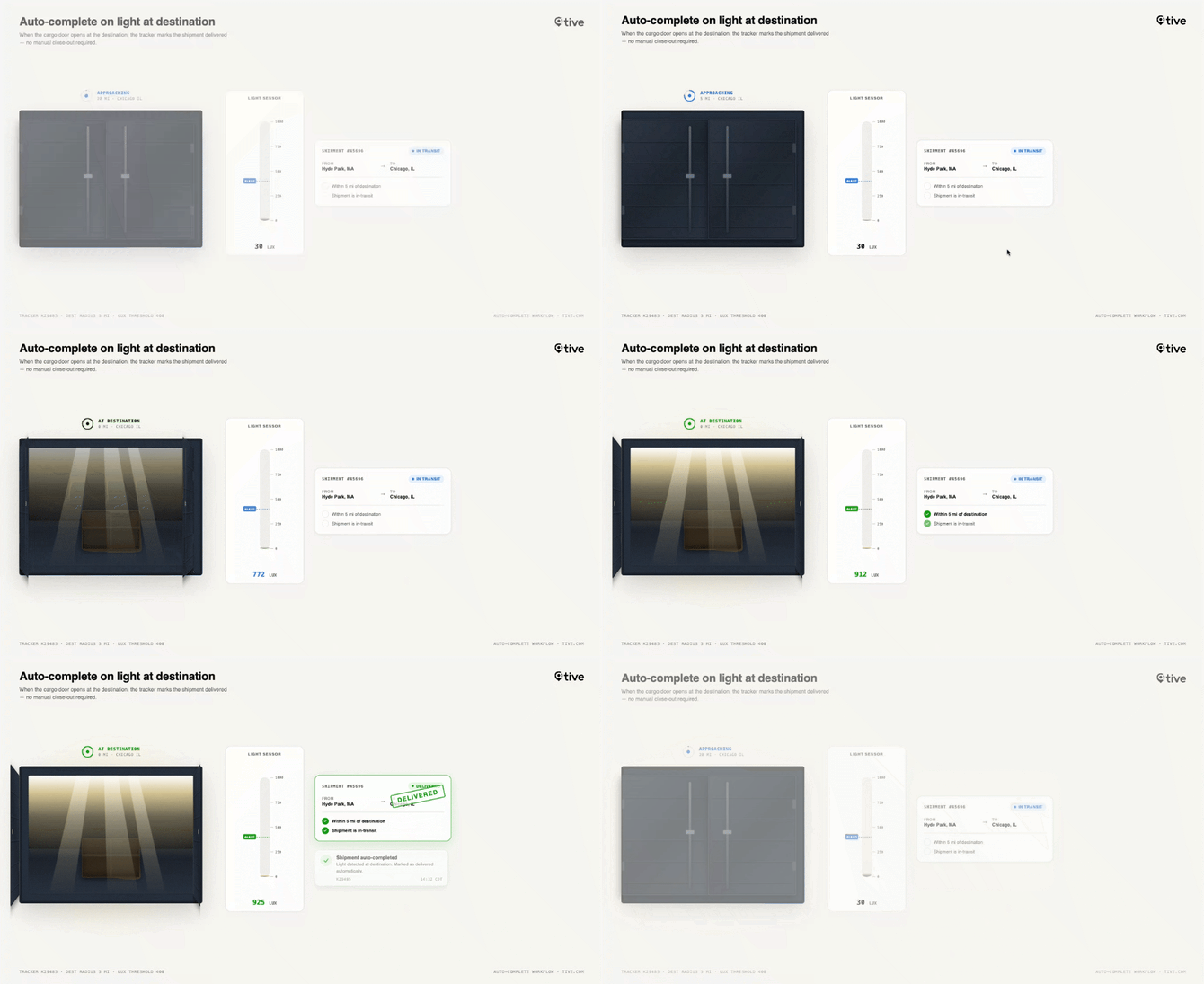
Disclaimer: This graphic is to demonstrate concepts and does not directly match platform functionality.
Goal: Automatically close out shipments when the tracker detects arrival, so your team doesn't have to manually mark shipments complete.
Preconditions
This template depends on the Light alert. It's what tells the workflow the shipment has arrived. Configure the Light alert to trigger at the destination, and keep it applied to the shipments you want closed automatically. If the alert isn't applied or isn't set to fire at the destination, the workflow never starts, and the shipment won't auto-complete.
Notifications are optional. If you want to be told when a light alert triggers at the destination, which will trigger shipment completion, add recipients in the template's configuration. If you'd rather complete shipments silently, leave the recipient list empty. The shipment still closes, you just won't get an email about it.
What it does
When a light alert fires while the shipment is inside its destination geofence, this workflow marks the shipment as Completed. A light event at the delivery site, typically a container or trailer being opened for unloading, is a strong ground-truth signal that the goods have arrived.
Why a light alert
A light event near the destination is a strong ground-truth signal that the goods have arrived and been opened for unloading. Unlike a status update from a carrier system, this comes directly from the device's sensor, so it reflects what physically happened to the shipment.
How the destination is determined
The trigger is the light alert occurring inside the destination's geofence, not within a fixed radius. The geofence is whatever you've configured for that location when setting up your locations and shipments, so its size and shape are under your control.
The workflow evaluates against the final leg's destination address. On a multi-leg shipment, intermediate stops don't count, only the last destination does.
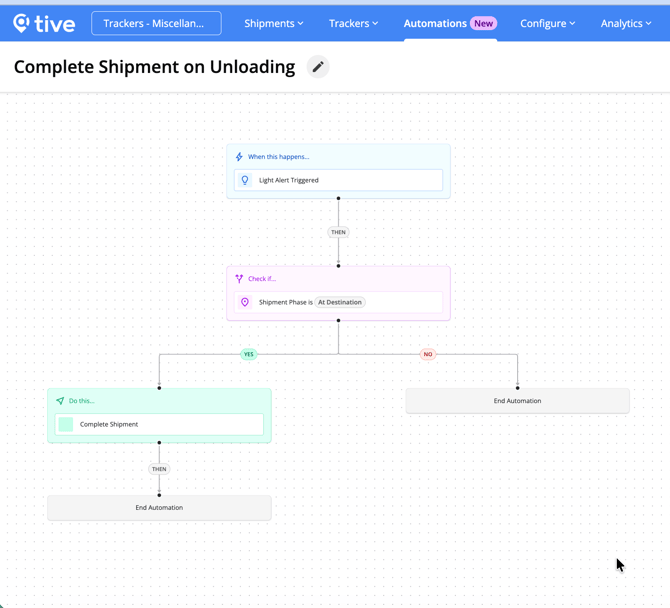
Logic
- Trigger: Light alert detected within the destination geofence.
- Action: Sets shipment status to Completed and posts a timestamped comment to the shipment.
Configuration
|
Allowed |
Not allowed |
|---|---|
|
Toggle the workflow active/inactive |
Change the trigger type |
|
Add/remove/reorder steps |
Things to know
A few edge cases can cause this workflow to complete a shipment when you might not expect it to:
- Light alert after leaving the destination: If a shipment reaches its destination without a light alert, then leaves, and a light alert fires afterward, the workflow may still mark the shipment complete even though it's no longer at the destination.
- Light alert after a new destination is added: If a leg is added after the original destination is reached (A→B becomes A→B→C), a light alert fired away from the new destination (C) may still complete the shipment. The workflow relies on the destination it has already reached rather than re-checking against the current active destination.
Intelligent Shipment Completion
Knowing when your shipment has reached its final destination helps you understand whether or not it still needs to be monitored for potential risks. Intelligent shipment completion uses advanced logic to determine when your shipment has likely reached its final destination and, depending on confidence level, will notify you of shipments that require your review before completing them. For more details, see the article here.
Before you start (applies to all templates)
- Apply the triggering alert to your shipments. The most common reason a workflow never runs. No alert on the shipment means no trigger.
- Platform tiers vary by template. See each template's header. Risk Event and Likely Theft require Plus/Premium platform; Route Deviation requires Premium platform; Red Zone Stop Escalation requires Plus/Premium.
- By default, only Admin users can see, edit, activate, or deactivate workflows. However, Admin users can grant the Add/Edit Workflows permission to other roles under Users → Manage Roles.