---
title: Product Release Notes
description: This article provides an overview of product release notes.
---
[Skip to content](https://support.tive.com/en-us/product-release-notes#main-content)
- [English - United States](https://support.tive.com/en-us/product-release-notes)
- [Español](https://support.tive.com/es/product-release-notes)
English - United States
Show submenu for translations
[](https://new.support.tive.com/?hsLang=en-us)
- [Home](https://support.tive.com/)
- [API Support](https://developers.tive.com/docs/rest-api-overview)
- [Documents & Certificates](https://new.support.tive.com/documents-and-certificates)
- [Tive Platform](http://platform.tive.com/)
- [What's New](https://new.support.tive.com/product-release-notes)
Open main navigation
Close main navigation
- [Home](https://support.tive.com/)
- [API Support](https://developers.tive.com/docs/rest-api-overview)
- [Documents & Certificates](https://new.support.tive.com/documents-and-certificates)
- [Tive Platform](http://platform.tive.com/)
- [What's New](https://new.support.tive.com/product-release-notes)
- - [English - United States](https://support.tive.com/en-us/product-release-notes)
- [Español](https://support.tive.com/es/product-release-notes)
English - United States
Show submenu for translations
- Contact us
Contact us
How can we help you?
- There are no suggestions because the search field is empty.
1. [External Knowledge Base](https://support.tive.com/en-us?hsLang=en-us)
2. [Getting Started](https://support.tive.com/en-us/getting-started?hsLang=en-us)
3. [Platform](https://support.tive.com/en-us/getting-started?hsLang=en-us#platform)
# Product Release Notes
## Here's a monthly roundup of new features and enhancements
This article includes product updates organized as below:
- #### **[2026](https://support.tive.com/en-us/product-release-notes#year2026)**
- #### **[2025](https://support.tive.com/en-us/product-release-notes#year2025)**
### September - 2026
Welcome to your September 2026 Tive Product Release Notes!
This month, we’ve delivered enhanced precision, richer operational context, multi-modal versatility, and smarter risk prevention across your supply chain. Here is a breakdown of the major capabilities now available in your Tive ecosystem.
### **1. Perishables Monitoring Workflow Template**
#### **What’s New**
Gain visual proof of cargo condition and equipment settings at the moment of loading and arrival with **Reefer Photo Capture**, integrated into the Tive Perishables Monitoring workflow.
- **Photo check requested automatically:** When an in-transit shipment triggers a temperature alert, Tive emails the carrier and asks for a photo of the reefer display. No more chasing the driver by phone.
- **Replies go to your team and onto the shipment:** The carrier's reply and photo are forwarded to your monitoring team, and are posted in the shipment comments in the platform.
- **Reply summaries and classification:** Each carrier reply is summarized and classified as **Resolve**, keep monitoring, or escalate. The classification shows the next step toward resolving the alert.
#### **Why It Matters**
Eliminate the manual burden of collecting, filing, and matching physical load photos to shipment records. By automatically capturing, geotagging, and attaching visual proof directly into your Tive shipment workflow, your operations and QA teams save hours of manual administrative work per shipment. Automated visual documentation bridges the gap between sensor data and reality, accelerating claims resolution, ensuring loading compliance, and replacing fragmented paper/email trails with a single, audit-ready digital source of truth.
For additional information on Workflow Automation and available templates, explore our [full documentation here](https://support.tive.com/en-us/workflow-automations?hsLang=en-us).
### **2. Adaptive Ocean Visibility**
#### **What’s New**
Ocean shipments move at two very different paces. On the road, things change by the hour; at sea, little changes for weeks. Adaptive Ocean Tracking matches tracker transmission intervals to each scenario: frequent updates on road legs and battery-saving updates at sea, switched automatically based on where the container is.
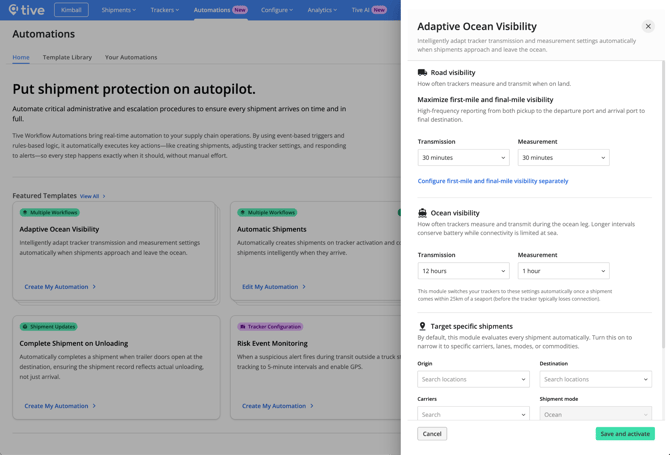
- **High-visibility road mode:** On the first leg to the port of origin and the inland leg from the port of discharge, the tracker reports at your configured road interval. You get close visibility into pickup and inland transit, where delays and handoff issues actually happen.
- **Battery-saving ocean mode:** As the container approaches the port of origin, the tracker is set to switch to your ocean interval. Weeks at sea no longer drain the battery, so the tracker still has plenty of power when the container lands and the inland leg begins.
- **Fully automatic:** Set both intervals once and every switch happens automatically. No tracker reconfiguration mid-journey required.
#### **Why It Matters**
You no longer have to choose between a tracker that survives the voyage and one that reports often enough to be useful on land. Every ocean shipment gets both.
For additional information on Workflow Automation and available templates, explore our [full documentation here](https://support.tive.com/en-us/workflow-automations?hsLang=en-us).
### **3. Cumulative Temperature Alerts**
#### **What’s New**
Temperature breaches aren’t always single, catastrophic spikes: sometimes the real damage comes from repeated, brief excursions over time. Our new **Cumulative Temperature Alert** tracks the total duration a shipment spends outside its optimal thermal range.

- **Time-Above-Threshold Tracking:** Define custom rules based on total elapsed time outside set limits (e.g., *Alert if cargo spends a combined total of \>45 minutes above 8°C throughout a 3-day transit*).
- **Mean Kinetic Temperature (MKT) Alignment:** Supports shelf-life degradation models by measuring aggregate thermal stress, rather than isolated spikes.
- **Proactive Escalations:** Receive real-time notifications before cumulative exposure reaches a critical threshold, allowing your monitoring team to intervene before product quality is compromised.
#### **Why It Matters**
Prevent unnecessary product rejection. By tracking total thermal exposure rather than just instant excursions, quality assurance teams can make data-backed decisions on whether a shipment is safe to release or if it needs immediate re-routing.
### 4. Mobile - Scan Trackers to add to shipments
#### **What's New**
Plus and Premium customers can now assign trackers to shipments and start shipments directly from the Tive mobile app.
.gif?width=289&height=626&name=Screen_Recording_20260901_123655_Tive%20Preview%20(1).gif)
- **Scan or Type to Assign:** Open an upcoming shipment, tap Assign Tracker, and scan the barcode with your phone camera or enter the serial number. The app verifies the tracker is eligible before linking it.
- **Start Shipments On-Site:** Once a tracker is attached, a Start Shipment button appears. One tap moves it to In-Transit.
- **Quick Filters for Dock Workflows:** The Upcoming tab now has filter chips like "Needs Action" (shipments without a tracker) and "Departing Today," so dock workers can quickly find the shipments that need attention right now.
#### **Why It Matters**
Many customers today rely on spreadsheets, emails, or manual coordination to make sure the right trackers get on the right shipments. The person at the dock attaching a tracker is rarely the same person who created the shipment in the platform. This feature removes that handoff. Dock workers can find their shipments, assign trackers, and start them on their own, which helps increase shipper compliance and reduce retailer fines and chargebacks.
### **Minor Enhancements:**
- **Red Zone Stop Escalation now shows in your language** - Workflow titles and descriptions on the Automations tab are now displayed according to your user settings language, whereas they previously defaulted to English.
- **Faster map performance** - Resolved an issue causing the base map to load slowly or remain blank while the rest of the shipment details rendered.
- **Shipment Comments** - Resolved an issue on the shipment details page where users were unable to enter or submit comments.
### 2025
### November
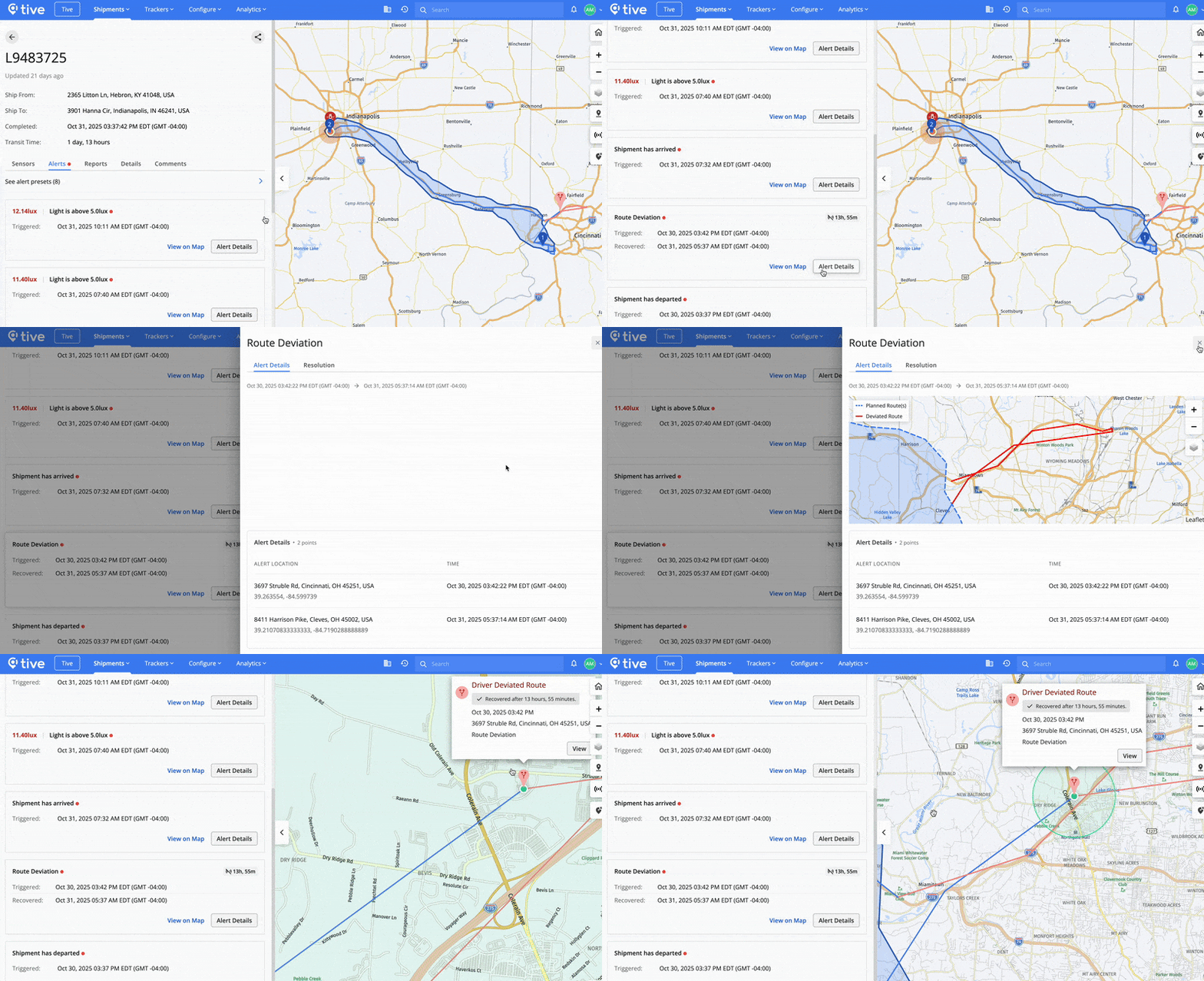
#### **Keep Shipments Secure with Smarter Route Deviation Alerts**
Route Deviation alerts are now live for all **Premium** customers, giving teams a faster way to catch risky detours before they disrupt deliveries or create compliance issues. This smart feature uses Tive Suggested Routes—built from millions of tracker journeys—to automatically map the most likely paths for each shipment’s origin and destination. From there, context-aware geofences and smart deviation detection filter out routine stops and normal traffic detours, so teams only get notified when a shipment truly moves off track. When a deviation occurs, users get real-time alerts and can see exactly where it happened on the map, adjust the route if needed, and maintain a clean digital audit trail for carrier accountability and internal SOPs.
If you’d like to explore upgrade options and learn how Route Deviation alerts can support your operations, contact your Tive Account Manager or Account Executive today.
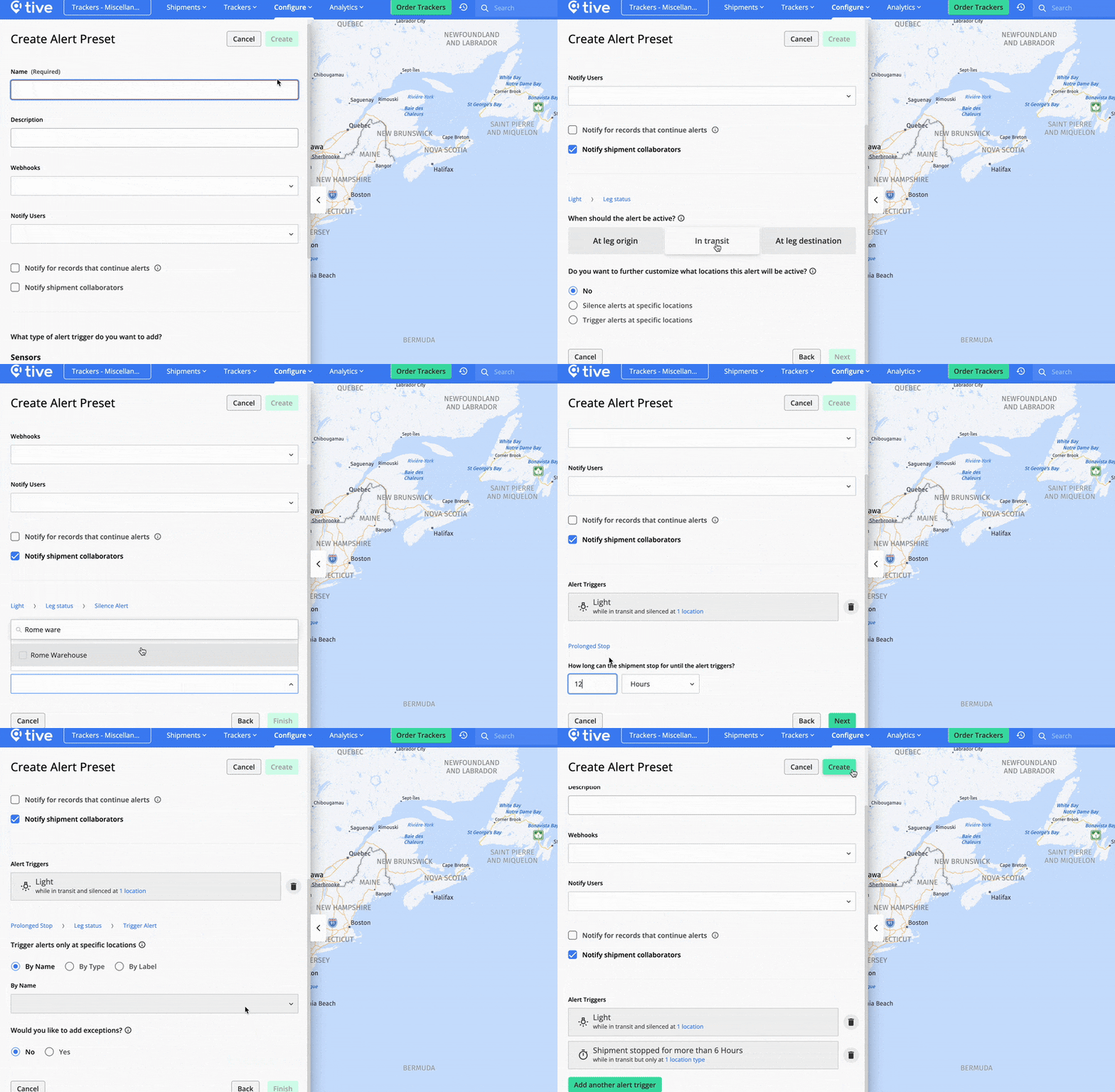
#### **Reduce Alert Noise Using New Location-Based Rules for Light & Stop Alerts**
Cut alert noise and surface critical risk signals using location-based rules for Light and Prolonged Stop alerts. Now you can tailor these alerts based on where a shipment is, and where you want them silenced or triggered. Choose which locations (by name, type, or label) should not raise alerts (such as your own warehouses or planned border crossings) so routine activity doesn’t interrupt your team.
For critical security scenarios, alerts focus on the high-risk zones you’ve designated so your team only hears about the stops that matter. This gives you more control over when alerts fire, eliminates unwanted notifications, and ensures that your team only gets notified when a door opens unexpectedly on the road or a truck stops too long in a risky area.
This feature is available for **Plus** and **Premium** platform customers. If you’d like to explore upgrade options, contact your Tive Account Manager or Account Executive today.
#### **Little Fixes = Big Improvements**
- You can now share location labels across your accounts.
### October
#### **Improve Cold Chain Performance with Reveal**
Reveal is Tive’s new analytics add-on product that turns shipment data into trusted insights—so you can reduce risk, cut avoidable costs, and keep improving how your network performs. It helps you uncover shipment trends, benchmark routes and lanes against the broader Tive Network, and find where performance gaps are costing you the most.
The current version focuses on **cold chain compliance** and **temperature performance** insights, helping you prevent delays, spoilage, and claims before they add up. Contact your Account Manager to **start a free trial** today.
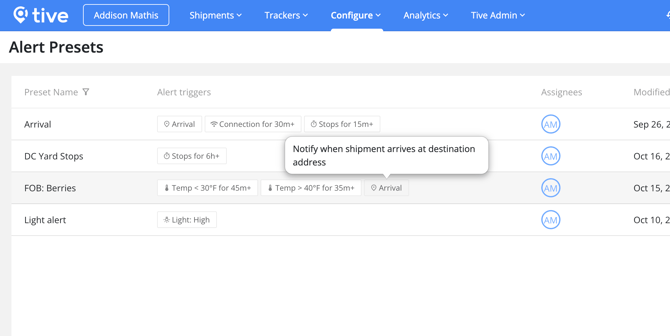
#### **See Every Alert Trigger At a Glance in the Alerts Presets List**
No more guessing what’s included in each alert preset. You can now view all alert triggers—such as temperature thresholds, light, or stop duration—directly from the **Alert Presets** list without clicking into each one. This makes it faster to review, compare, and manage alert configurations across your shipments.
#### **Little Fixes = Big Improvements**
- SMS alert notifications now include a shipment URL link for quick access to sensor data
- SMS notifications for location-based alerts (Light, Shock, Prolonged Stop, Arrival, Departure) now show shipment leg details instead of a URL link
- View collaborators directly from the **Locations** list to see who has access to each location
### September
#### **Find Shipments Faster Using New Commodity Filters**
Quickly narrow down your shipment list by commodity name or category to focus on the products that matter most—whether it’s pharma, produce, or electronics. Filtering by commodities helps you spot product-specific trends and performance at a glance. If you haven’t started using commodities yet, add them to your shipment templates to take advantage of upcoming analytics and reporting features.
.gif?width=582&height=352&name=ScreenRecording2025-10-15at4.01.19PM-ezgif.com-optimize%20(1).gif)
#### **Keep Everyone in the Loop with @mentions in Shipment Comments**
Tag teammates directly in shipment comments to share updates, flag issues, or ask quick questions—right where the shipment data lives. This helps teams collaborate faster and resolve problems without switching tools. This feature is available for **Plus** and **Premium** tier customers.
.gif?width=541&height=327&name=ScreenRecording2025-10-15at3.53.30PM-ezgif.com-optimize%20(1).gif)
#### **Little Fixes = Big Improvements**
- The **Locations** page now defaults to showing locations from your account, hiding Tive-provided locations by default
- View **Prolonged Stop** alerts directly on the shipment map to quickly identify where delays occurred
- Create and track metrics by **Commodity** or **Commodity** **Category** in custom dashboards for more targeted insights
- **Tive Tag:** Log in with SSO on the Tive Tag mobile app for faster, more secure access
### August
#### **Get Clarity on What You’re Shipping with Commodities**
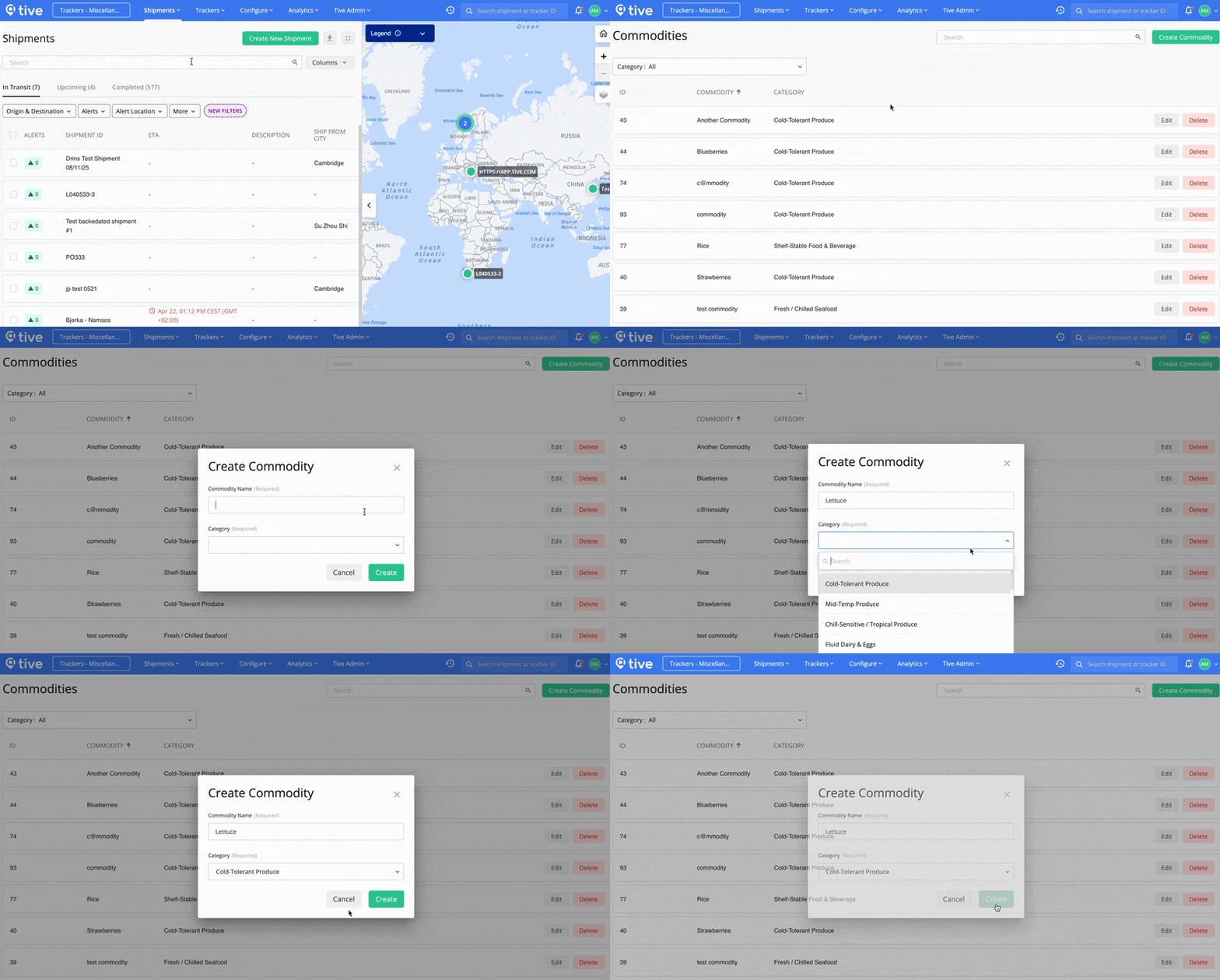
With **Commodities**, you can now easily build and manage a list of the products you ship—whether broad categories like “Fresh Blueberries” or specific product SKUs—so your team always knows what's on the move. Once set up, commodities can be added to shipments or shipment templates, giving you cleaner data and insights into how every product is performing across your supply chain. To get started, just head to the Configure tab, then select **Commodities** from the drop-down menu.
#### **View Alert Details in Sensor Charts & on the Shipment Map**
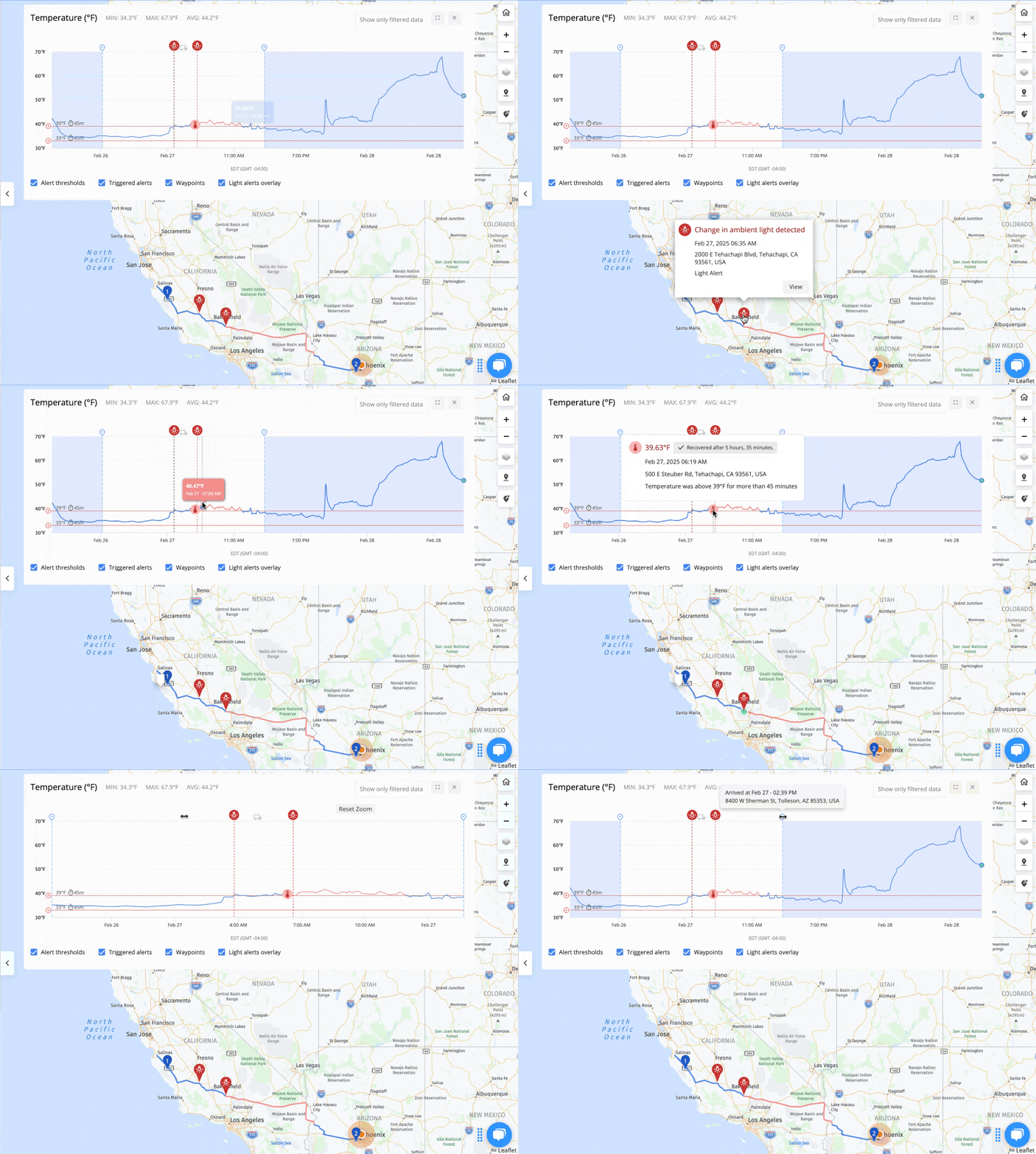
Now you can see alert details in sensor charts and on the shipment map. View exactly what condition triggered the alert, the sensor values at that moment, and the exact time and location of the alert. Shipment stage markers—such as departure, arrival, or leg changes—appear alongside, helping you connect alerts to shipment activity. This gives you the context to spot root causes, confirm shipment quality, and act quickly to prevent product loss.
#### **Little Fixes = Big Improvements**
- Plus and Premium tier users can now tag users in shipment comments.
- In your organization’s Account Settings, alert recovery emails can now be disabled to reduce alert noise in your inbox.
- Users can now generate reports in CSV and PDF formats from shared shipment links.
### June
#### **Sensor Charts Now Show Alerts, Thresholds, and Locations for Clearer Context**
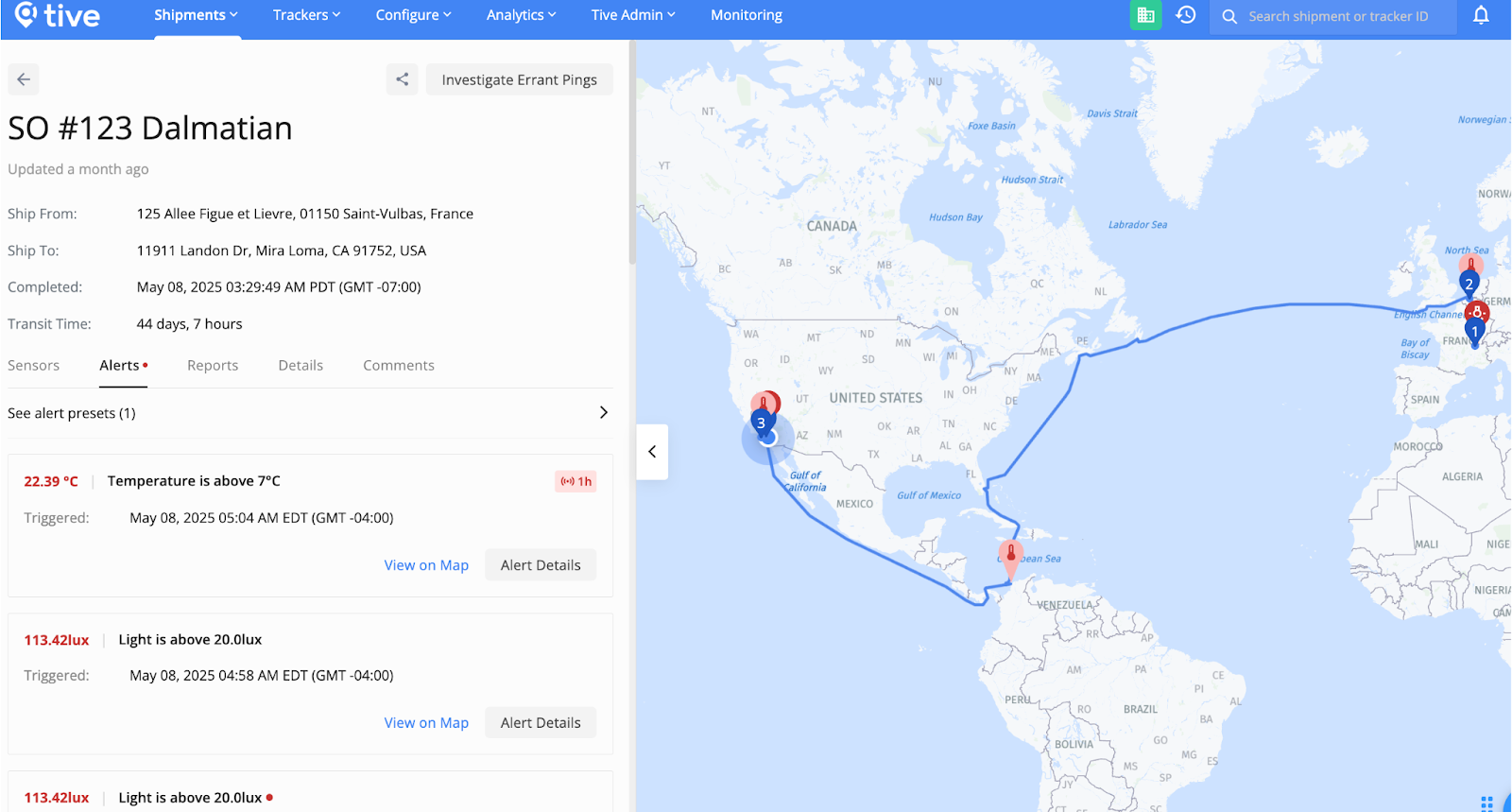
Sensor charts now visualize alert thresholds, show where data points were captured (like ports and waypoints), and display when alerts were triggered and resolved—giving you clearer context in a single view to help you make sense of your shipment data.
****
#### **Little Fixes = Big Improvements**
- **View alert trigger values when applying presets to shipments.** When picking which alert preset you want to attach to a shipment leg, the dropdown will now show the alert triggers associated with each alert, making it easier to ensure you’re attaching the right alert to each leg
- **Retrieve shipment comments via API.** Integrated customers can now access all comments tied to a specific shipment using the new “Retrieve Shipment Comments” endpoint—making it easier to sync context across systems and streamline internal workflows.
- **Shipment Portal Enhancements.** Shared shipment portals just got more powerful—with access to the new sensor chart and updated shipment map views. Customers can also enable a new “Show Alerts” setting to display all in-transit alerts directly in the portal. Additionally, users can now download shipment data as a CSV file, in addition to the existing PDF export option.
### May
#### **Set It and Forget It Using Bulk Location Upload**
Upload all your key supply chain locations at once to ensure every shipment has the correct address and geofence—keeping ETAs accurate and shipments complete without delays. This feature is available for all customers.
.png?width=550&height=310&name=Bulk%20Location%20Upload%20(1).png)
#### **Find Critical Shipments Faster with Enhanced Filtering**
New sorting and filtering options on the Shipments list make it easier to cut through the noise—and quickly identify shipments that need immediate attention—so you can stay focused on what matters most. This update is now available for all customers.
.png?width=550&height=423&name=Shipment%20List%20Filters%20(1).png)
#### **Reference Saved Locations via API—for Smarter Shipment Setup**
Use a unique Tive location ID when calling the **Create Shipment** endpoint to accurately apply saved geofences—reducing setup errors and ensuring shipments are linked to the right locations. You can now find these IDs in the Saved Locations list inside the platform.
.png?width=670&height=410&name=Reference%20saved%20locations%20via%20API%20(2).png)
#### **Little Fixes = Big Improvements**
- **We added new options to Location Types.** When creating or editing a location, the Location Types list now includes options for Production Facility, Terminal (Rail/intermodal/etc), Border crossing, service stop (Rest/Fuel/Etc).
- **Cut down on alert fatigue by disabling alert recovery emails**. You can now disable alert recovery emails to minimize alert fatigue. Navigate to **Organization** \> **Accounts**, then edit your account settings. Please note: This must be done for each account.
- **Get the full story behind every alert using the API.** Now you can use the API to retrieve a complete history of alert resolutions—to see when status changes happened, who resolved them, and what comments were added. This is available now via the **Get Shipment Alerts** endpoint.
### April
#### **Track ETAs for Air and Ocean Legs with Greater Clarity**
You can now view ETAs for both individual air and ocean legs—as well as the full shipment—so you can plan ahead with more confidence and keep stakeholders informed. This feature is only available for **Premium** tier customers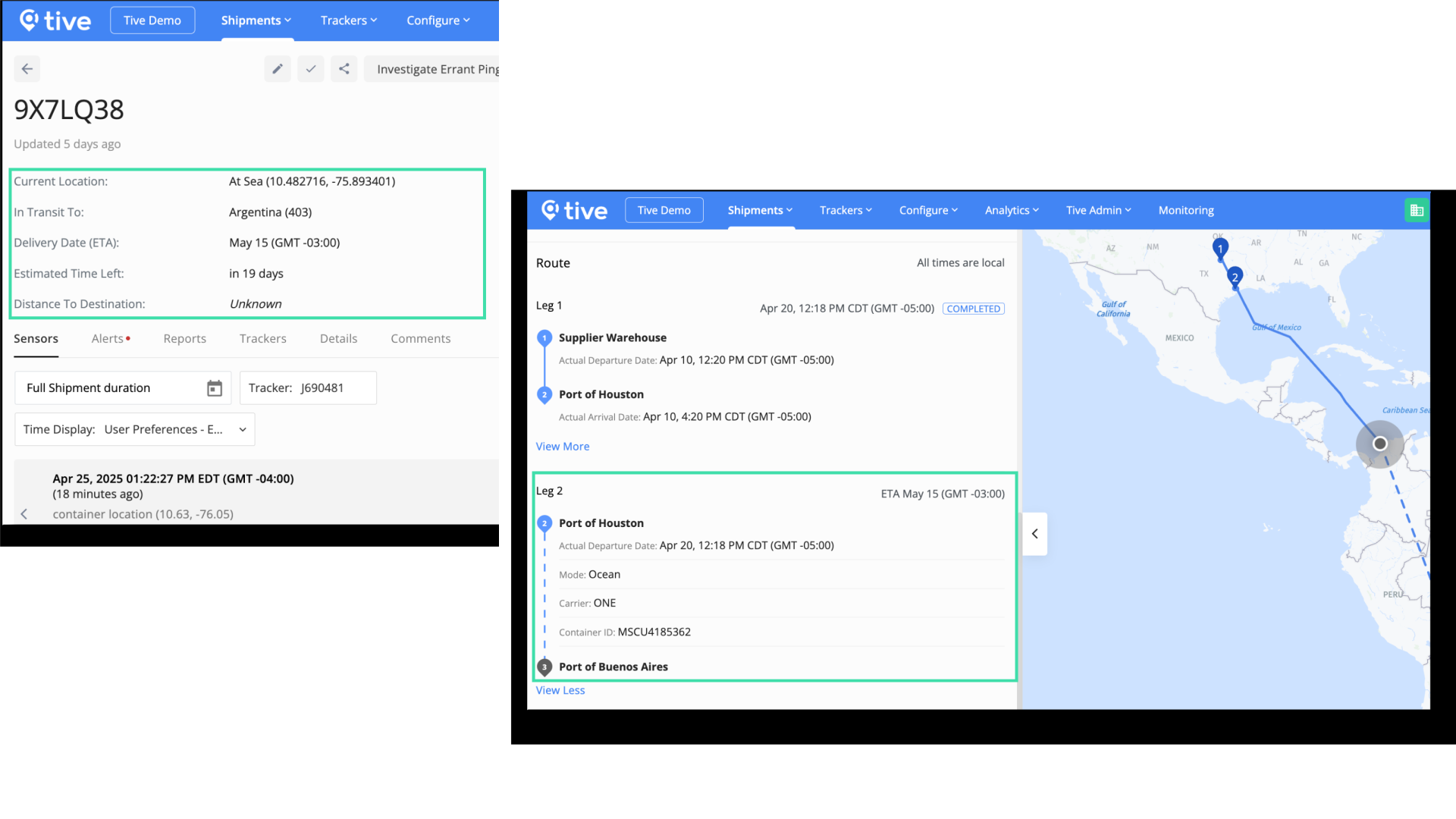
#### **New Options for Custom Shock Alerts**
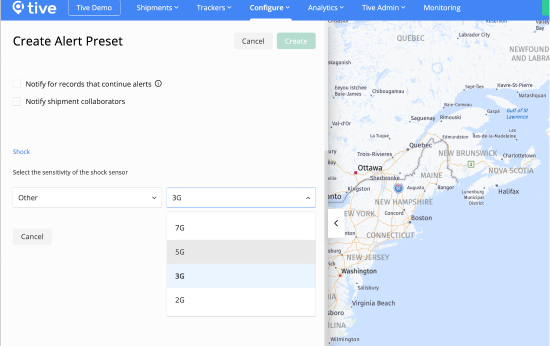
We’ve added 5G and 7G options to the “Other” field in Shock alert presets—helping cut down on unnecessary alerts for shipments with different shock sensitivities based on vehicle type, route, or packaging.
#### **Create Saved Locations without Leaving Shipment Creation**
You can now create new saved Locations directly from the Shipment Creation page—making it faster and easier to build shipments without breaking your stride. Saved Locations help ensure every shipment has the correct address and geofence, so ETAs stay accurate and shipments complete without delays.
.png?width=670&height=453&name=Untitled%20design%20(73).png)
### **March**
#### **Easily Share Locations Across Accounts in Your Organization**.
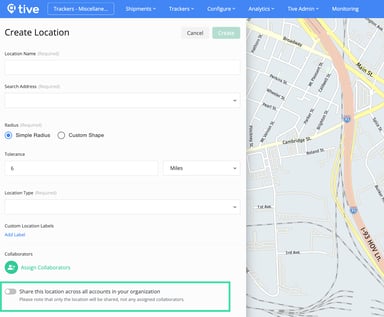
Now when you create a location, you can easily share it across all accounts within your organization. Create locations and geofences once—set it and forget it! Accurate locations and well-defined geofences are critical for reliable alerts and successful shipment completion. Please note: Assigned collaborators remain account-specific. This feature is available for **Premium** tier platform customers.
#### **Organize Saved Locations with Labels and Types**
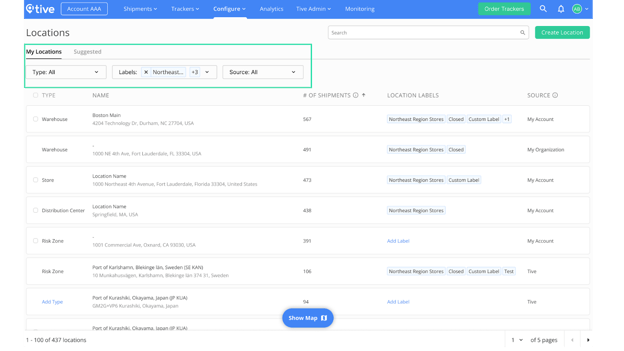
Improve how you manage your saved locations by choosing a **Location Type**—like warehouse, store, or distribution center—and adding **custom Labels** for easier identification. These features enable you to quickly find and use your saved locations. Location Types are available for everyone, while custom Labels are available for **Plus** and **Premium** tier platform customers.
Coming soon, location types and labels will unlock the following new features:
- Easily filter shipments by location type or label
- Create reports for specific locations
- Generate actionable insights to share with relevant stakeholders
### **February**
#### **📝 Keep Track of Critical Updates—In One Place—Using Shipment Comments**
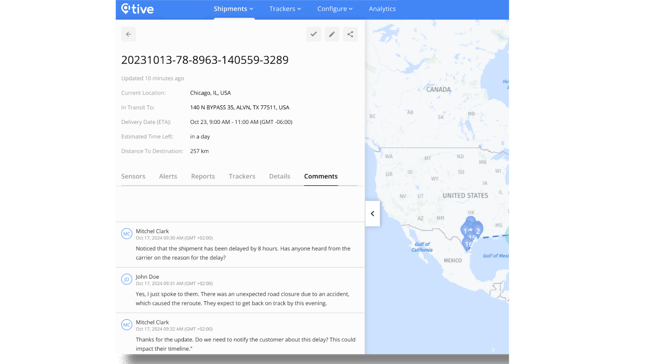
Track progress, discuss changes or issues with team members, attach related files, and maintain an audit trail for communication in transit using shipment comments. Available only for **Plus** and **Premium** tier customers.
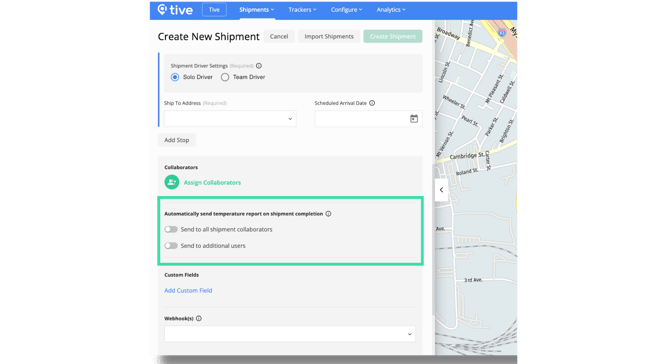
#### **🌡️ Save Time Making Sure the Right People Receive Temperature Reports**
Set up shipment templates to automatically send detailed temperature reports to specific collaborators or users at the end of every shipment. Available for **Premium** tier customers.
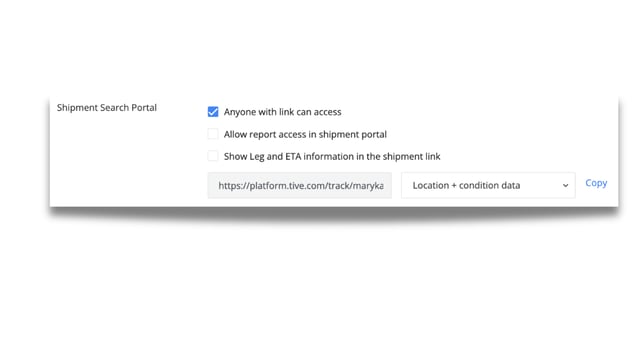
#### **⏱️ Keep Receivers Informed with Accurate ETAs** **on Shared Shipment Links**
Improve coordination and reduce confusion by viewing ETAs for shipments and specific legs on shared shipment links. Tive admins can enable this feature under their organization settings. Available for **Plus** and **Premium** tier customers.
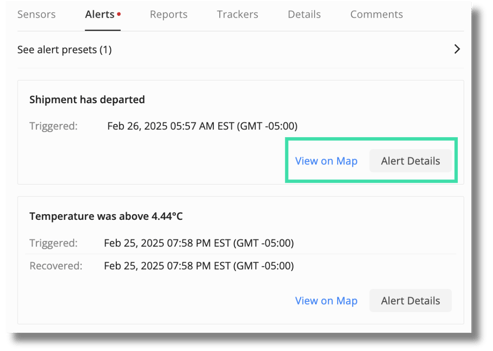
#### **Quickly Pinpoint Alert Locations On The Map**
No more copying and pasting addresses: simply click “View on Map” to see exactly where an alert occurred, making it easier to respond to critical shipment events. Available for all customers.
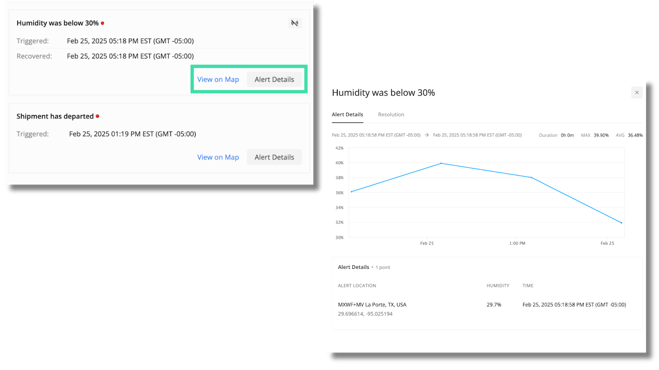
#### **Get The Context You Need to Respond Faster with Enhanced Alert Details**
Alert details now provide trigger values, thresholds, location, duration, and tracker information—all in one view—so you can act quickly and confidently. Available for all customers.
### **January**
#### **Plan Deliveries Better with More Accurate ETAs**
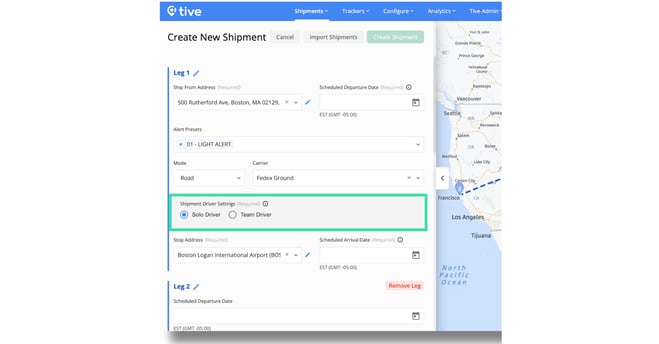
Choose if a shipment leg is run by one driver or a team when creating shipments to get more accurate ETAs, so you can better plan and prepare for arrivals. This feature is available on all platform tiers except **Essential**.
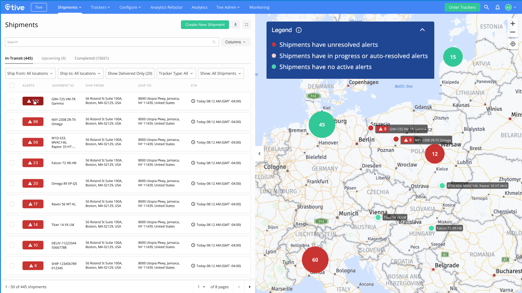
#### **A Global View of Alerts that Require Action—All in One Place**
Gain a central view of your in-transit shipments with prioritized alerts displayed on the map and in the **Shipments** list. Save time by quickly finding alerts that require immediate action. This feature is available for all customers.
****
#### **Find and Fix Costly Supply Chain Issues Using Custom Dashboards**
Create your own metrics and dashboards to see what’s working in your supply chain operations—and what’s not. Organize data in ways that are most helpful to your supply chain by creating metrics about shipments, alerts, and carriers. Measure performance and track trends for specific roles, regions, or objectives in dynamic dashboards. Available to **Premium** platform customers.
#### **Get the Full Picture of Your Shipments with Summary Analytics**
Gain visibility into shipment performance over time with accurate analytics—Spot trends and track performance over time using historical data. Refine your view using filters, custom date ranges, and time intervals. Available for **Plus** and **Premium** platform customers only.
- [Getting Started](https://support.tive.com/en-us/getting-started?hsLang=en-us#main-content)
- [Platform](https://support.tive.com/en-us/getting-started?hsLang=en-us#platform)
- [Trackers](https://support.tive.com/en-us/getting-started?hsLang=en-us#trackers)
- [Tive Mobile App](https://support.tive.com/en-us/getting-started?hsLang=en-us#tive-mobile-app)
- [Tive Devices](https://support.tive.com/en-us/tive-devices?hsLang=en-us#main-content)
- [Devices](https://support.tive.com/en-us/tive-devices?hsLang=en-us#devices)
- [Tive Tag](https://support.tive.com/en-us/tive-devices?hsLang=en-us#tive-tag)
- [Functionality](https://support.tive.com/en-us/tive-devices?hsLang=en-us#functionality)
- [Your Organization](https://support.tive.com/en-us/your-organization?hsLang=en-us#main-content)
- [Software](https://support.tive.com/en-us/your-organization?hsLang=en-us#software)
- [Hardware](https://support.tive.com/en-us/your-organization?hsLang=en-us#hardware)
- [Shipments](https://support.tive.com/en-us/shipments?hsLang=en-us#main-content)
- [Shipment Alerts](https://support.tive.com/en-us/shipments?hsLang=en-us#shipment-alerts)
- [Shipment Creation](https://support.tive.com/en-us/shipments?hsLang=en-us#shipment-creation)
- [Shipment Data](https://support.tive.com/en-us/shipments?hsLang=en-us#shipment-data)
- [Settings](https://support.tive.com/en-us/shipments?hsLang=en-us#settings)
- [Shipment Collaboration](https://support.tive.com/en-us/shipments?hsLang=en-us#shipment-collaboration)
- [Tive Reveal](https://support.tive.com/en-us/tive-reveal?hsLang=en-us#main-content)
- [Tive Reveal Overview](https://support.tive.com/en-us/tive-reveal?hsLang=en-us#tive-reveal-overview)
- [Data Processing and Freshness](https://support.tive.com/en-us/tive-reveal?hsLang=en-us#data-processing-and-freshness)
- [Carrier Insights](https://support.tive.com/en-us/tive-reveal?hsLang=en-us#carrier-insights)
- [Lane Insights](https://support.tive.com/en-us/tive-reveal?hsLang=en-us#lane-insights)
- [Sharing Data](https://support.tive.com/en-us/sharing-data?hsLang=en-us#main-content)
- [Shipments](https://support.tive.com/en-us/sharing-data?hsLang=en-us#shipments)
- [Analytics](https://support.tive.com/en-us/analytics?hsLang=en-us#main-content)
- [Platform](https://support.tive.com/en-us/analytics?hsLang=en-us#platform)
- [Dashboards](https://support.tive.com/en-us/analytics?hsLang=en-us#dashboards)
- [Workflow Automations](https://support.tive.com/en-us/workflow-automations?hsLang=en-us#main-content)
- [Workflow Automations Overview](https://support.tive.com/en-us/workflow-automations?hsLang=en-us#workflow-automations-overview)
- [Workflow Automation Templates](https://support.tive.com/en-us/workflow-automations?hsLang=en-us#workflow-automation-templates)
[](http://tive.com)
© 2026 Tive is a registered trademark of Tive, Inc.
```json
{
"@context" : "https://schema.org",
"@type" : "VideoObject",
"contentUrl" : "https://2849111.fs1.hubspotusercontent-na1.net/hubfs/2849111/video_assets/223747780937/inherited/web_optimized.mp4",
"dateModified" : "2026-10-06T14:28:20.879Z",
"duration" : "PT22S",
"height" : 1080,
"name" : "Perishables Monitoring Template",
"thumbnailUrl" : "https://2849111.fs1.hubspotusercontent-na1.net/hubfs/2849111/Perishables%20Monitoring%20Template.mp4/medium.jpg",
"uploadDate" : "2026-10-06T14:28:20.877Z",
"width" : 1920
}
```