
Push Notifications
The Tive mobile app sends push notifications to your phone when alerts are triggered on your shipments. Tapping a notification takes you directly to the relevant shipment and alert.
Collaborators also receive push notifications for shipments shared with them.
If you're not receiving push notifications, check that notifications are enabled for the Tive app in your device settings (iOS: Settings > Tive > Notifications; Android: Settings > Apps > Tive > Notifications).
Notification Settings
You can control how you're notified for each alert type. Go to Settings > Notification Settings to choose any combination of Email, SMS, and Push for each type. Alert types are grouped into categories (Sensor Alerts, Location Alerts, Events) to make it easier to find what you're looking for.
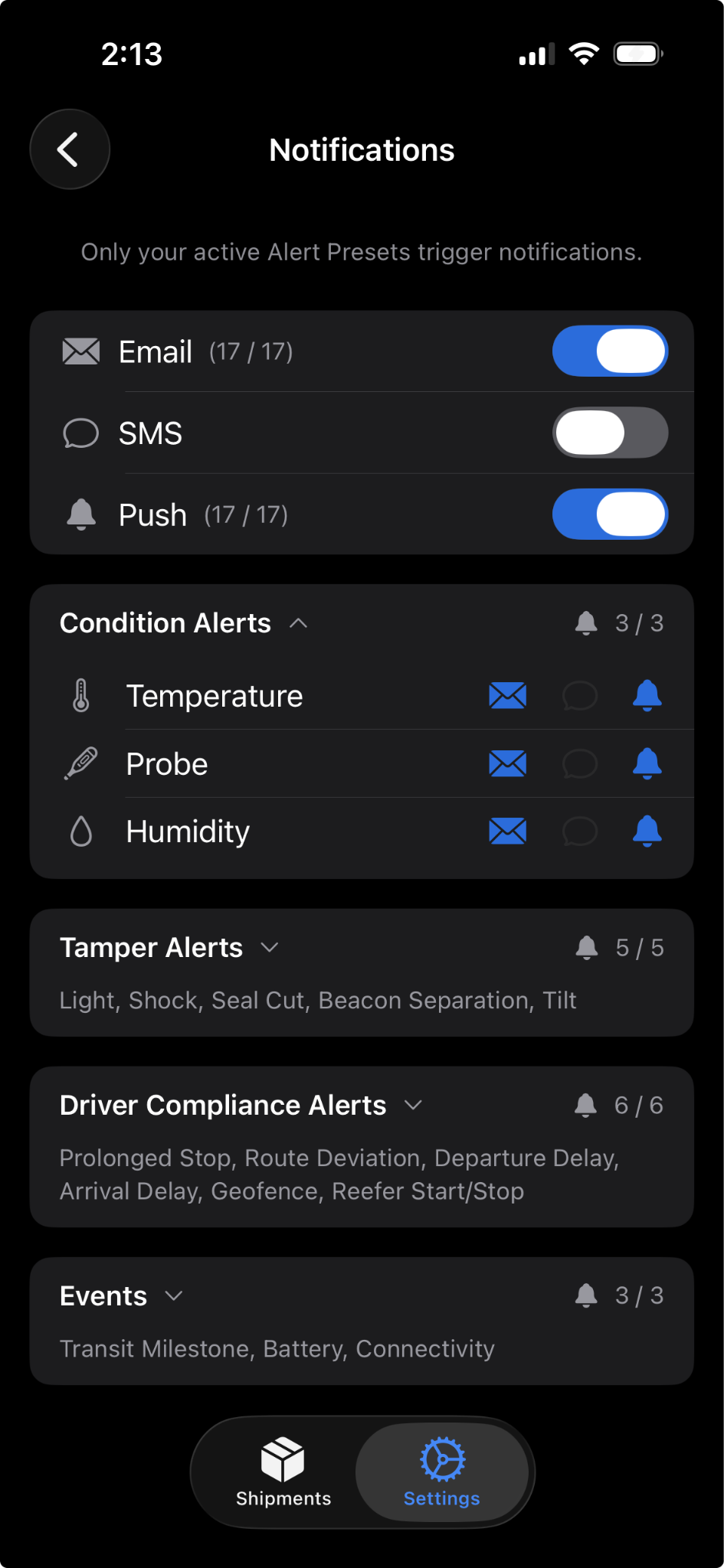
A few common things you might want to do here:
- Stop getting duplicate notifications. If you're receiving both SMS and push for the same alert, turn off SMS for that alert type and rely on push instead.
- Only get push for what matters most. Turn on Push for the alert types you need to act on immediately (like Temperature) and leave the rest on Email only.
- Quiet everything down. Use the global mute to stop all notifications temporarily.
Tier Differences
Plus, Retail Plus, and Premium customers have full control: configure Email, SMS, and Push independently for each alert type.
Essential and Retail Essential customers receive push notifications but can only mute all notifications at once. The per-alert-type toggles are visible but disabled. If you'd like to customize notifications by alert type, talk to your Tive contact about upgrading to Plus.
Troubleshooting
"I'm not getting push notifications." First, check that notifications are enabled in your device settings. If they are, make sure you haven't muted notifications in the app's Notification Settings. If you recently reinstalled the app, you may need to allow notifications again when prompted.
"I turned off an alert type, but I'm still getting notifications for it." Changes apply to future alerts only. Any alert that was already triggered before you changed the setting will still send its notification.
"I want to customize which alerts I get push notifications for, but the toggles are greyed out." Per-alert-type notification control is available on Plus, Retail Plus, and Premium tiers. On Essential and Retail Essential, you can receive push notifications but can't customize them by alert type.
Need Help?
If you have any additional questions, reach out to support@tive.com for help!