
Video Tutorial: Watch here
Why Use Smart Route Deviation Alerts?
The Smart Route Deviation Alert enhances Tive’s route deviation capabilities by intelligently generating routes for all road legs within a shipment.
Key benefits:
- Automatically identifies frequently used routes using Tive’s historical shipment data.
- Alerts users when a shipment deviates from its pre-defined path.
- Filter out noise from normal route changes, brief stops, or traffic detours using smart deviation detection and dynamic buffer zones
- Supports proactive shipment monitoring and enables faster response to potential theft or delays.
- Tive determines the most common paths for each shipment based on your historical data and millions of Tive tracker journeys
- Routes are applied automatically upon shipment creation.
Example Use Case:
A logistics team can use Smart Route Deviation Alerts to track high-value shipments and be instantly notified if a vehicle deviates significantly from a common route.
How It Works
Configuration
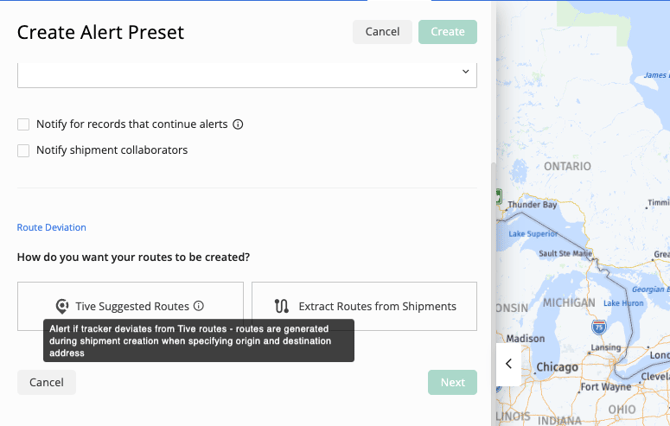
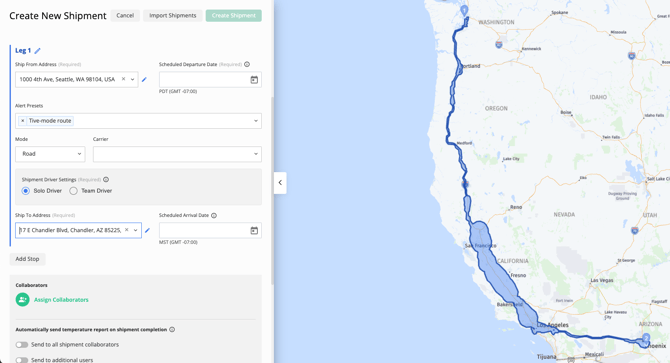
Step 1: Navigate to Create an Alert Preset → Route Deviation → select ‘Tive Suggested Routes’.Step 2: Save the alert preset and apply it to a shipment.
- Routes are generated during shipment creation.
To keep in mind:
- Only one Smart Route Deviation Alert trigger can be included in a preset.
- For non-road legs (Air, Ocean, Rail), smart route deviation does not apply.
- Tive suggested routes cannot be edited to reflect a different path.
How a Deviation is Detected
A deviation is triggered when two consecutive location points are detected outside the defined route.
This avoids false alarms, which may be caused by a single inaccurate location ping.
To ensure timely detection:
- Use lower transmission intervals (10 minutes or less) for frequent location updates.
- The faster the tracker pings, the quicker Tive can detect real deviations.
Alert Notifications and Details
When triggered, Smart Route Deviation Alerts notify users via email, SMS, or webhook.
In the Tive Platform:
- “View on Map” zooms directly to the deviation point.
- “Alert Details” displays both the planned route and the actual tracker path, clearly highlighting deviations.
- Webhook payloads include a new field “distance_away_from_route” – the exact distance from the planned route at the moment of alert.
Alert Resolution
Users can resolve alerts and mute further notifications until the shipment re-enters and exits the route again.
If a deviation occurs for a legitimate reason (e.g., avoiding traffic), users can select “Reroute” to update the planned route.
- A new route will be generated from the shipment’s current location to the closest point on the original path.
- The user must confirm the reroute before it’s finalized.
Note: The Reroute option is only available when an alert is in a “Not Started” state.
Note: In some cases, the system may not be able to generate a new route from the current location to the destination.

API Integration
Smart Route Deviation Alerts are fully supported in Public API v3.
- The new alert type can be created via Create an Alert Preset endpoint.
- On shipment creation, Tive automatically fetches and stores suggested routes for all road legs.
- If shipment leg addresses change, routes automatically update.
How Routes Are Generated
Tive Network Routes are built from a large volume of historical tracker data (sequences) that have traveled between a specific Origin and Destination (OD) pair.
Inclusion Criteria
To build these routes, we look at all available historical tracker data, not just data from your own specific shipments. This includes complete trips, partial trips, and any tracker that has traveled that path. By using this larger dataset, we get a much more complete and reliable picture of what's really happening on the ground.
How We Build a "Typical" Route
First, we look at all the tracker journeys and only keep the ones that are relevant to your origin and destination. Every trip must pass two key checks:
- The Proximity Check: The tracker must have passed reasonably close to both your start point (Origin) and end point (Destination). This "close" range is flexible: it's about 5 km for short trips and scales up to 25 km for very long-distance trips.
- The Realistic Distance Check: The path can't be a wild, roundabout journey. We compare the tracker's actual distance traveled to the straight-line "as the crow flies" distance.
Here’s an easy way to think about it:
- For short trips (like across a city), we're more forgiving. A truck might have to wind through city blocks or take detours. We allow its path to be up to 3.25 times longer than the straight-line distance.
- For long trips (like cross-country), we expect trucks to stick to major highways. We're much stricter, allowing the path to be only up to 1.75 times longer than the straight line.
Any journey that is excessively long is considered an outlier and isn't used.
Reliability Requirement: For a route to appear in the final output, it needs data from at least 10 tracker sequences, or at least 5 sequences if they include data from a shipment. Note: This does not guarantee that a route will be included in the final output. It also needs to have a sufficient total volume of data points to prove it’s a reliable and common path.
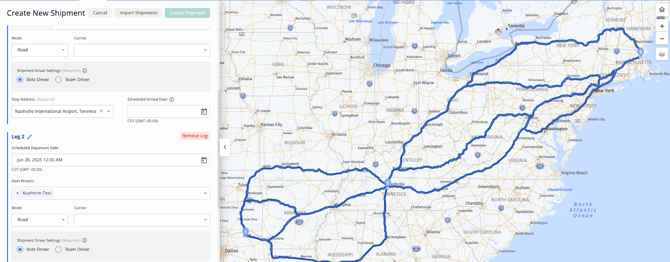
You'll notice our routes aren't just thin lines on a map; they are wider corridors. This width is intentional and shows the normal, expected variations for a given route.
We calculate this width by looking at all the real-world GPS, Wi-Fi, and Cell data points from the trackers that make up that route. We then map how far those points typically "spread out" from the central path.
This is why you'll see routes get wider near cities. In congested areas, trucks use different exits, take slightly different side streets, or navigate traffic, causing more "spread." On long, open highways, the path is narrower because trucks tend to follow a much more consistent line.
Key Points to Know
- Smart Route Deviation Alerts are available on the Premium tier.
Note: The alert is not supported for Ocean, Air, and Rail transport modes.
Note: Selecting among multiple visible paths is not possible; the system monitors deviations from all likely routes collectively.
Best Practices
For optimal results:
- Use trackers with transmission intervals ≤10 minutes.
- Always confirm “Reroute” adjustments after legitimate detours.
- Review alerts via the “View on Map” feature for context.
Pro Tip: Combine Smart Route Deviation Alerts with Prolonged Stop and Light alerts for a more comprehensive picture of security-related incidents.
In case you have any additional questions, you can reach out to support@tive.com for help!