
Why Use Reefer Start/Stop Alert?
Note: This feature is still in Beta and can be accessed only in Retail Plus, Plus, and Premium tiers.
The Reefer Start/Stop Alert is a specialized notification designed to detect when a refrigerated unit is operating in fuel-saving "Start/Stop" mode instead of the required "Continuous" mode.
- The Problem Solved: Prevents "hot spots" and heat buildup in fresh produce caused by the lack of continuous airflow when a reefer engine shuts off.
- Improved Efficiency: Allows you to intervene proactively by contacting drivers to switch to Continuous mode before cargo is compromised.
- Real-Life Scenario: In Start/Stop mode, a sensor on the outside of a pallet may read 34°F, while the center of the pallet rises to 40°F+ due to trapped heat from respiration.
- Workflow Impact: Provides the historical data necessary to substantiate claims and prove improper handling or driver negligence.
How It Works
The system uses a smart detection algorithm to analyze temperature patterns in real-time, looking for waveforms that indicate cycling.
1. Accessing the Feature
Navigate to the Configure menu and select Alert Presets.
2. Enabling or Setting It Up
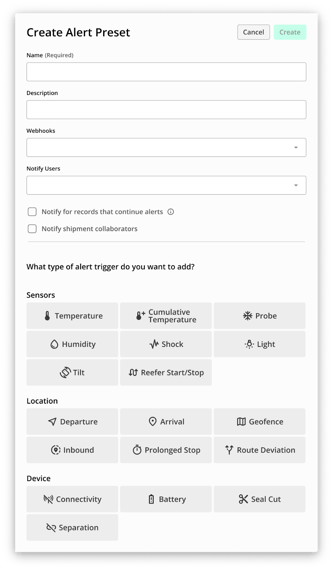
- Select an existing Preset or create a new one.
- Click on Reefer Start/Stop.
- Configuration: Select the specific shipment phases where the alert should be active (e.g., At leg origin, In transit, At leg destination).
- Save: Click the Save button to apply the changes.
3. Using the Feature
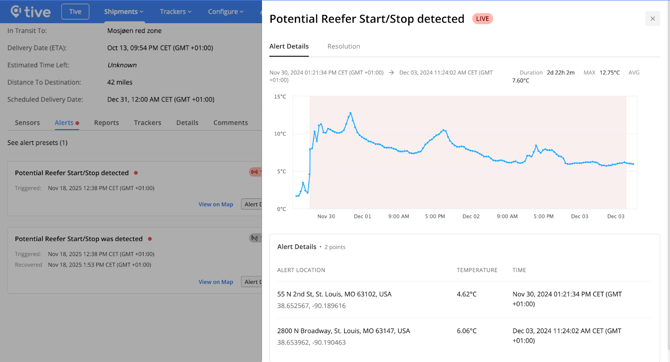
Once active, the algorithm monitors a sliding window of 2 to 4 hours. It flags a potential issue if fluctuations greater than 1.5°F (0.8 °C) persist for 60 to 120 minutes.
Tip: Verify the setting with the driver upon receiving an alert, as the detection is based on algorithmic patterns rather than a direct reefer controller connection.
4. Expected Results
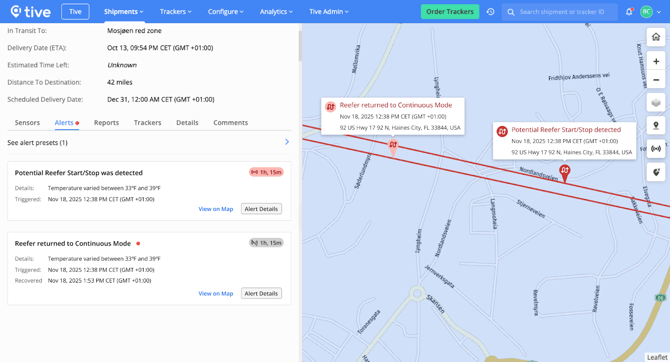
- Notifications: You will receive a single notification via Email, SMS, or Webhook if the pattern is detected.
- Recovery: If the unit is switched back to Continuous mode, the system will send a "Return to Continuous Mode detected" notification after approximately 1 hour of stable data.
Key Points to Know
- Tier Requirement: This feature can be accessed only in Retail Plus, Plus, and Premium tiers.
- Asset Restriction: This alert should only be applied to shipments using reefer trailers. Do not use it for dry vans, rail cars, or non-refrigerated assets.
- Integration: Alert events are available via Webhooks for integration into your TMS.
- Backdating: When an alert is triggered, the start time is backdated to the beginning of the detected cycling behavior.
Best Practices
- Optimizing Usage: Set both Measurement and Transmission intervals to 10 minutes. Longer intervals (like 1 hour) can delay the algorithm's ability to identify the cycle pattern.
- Data Accuracy: Ensure the cargo type requires Continuous mode (like fresh produce) before escalating alerts to drivers to maximize workflow efficiency.